
Entry
Reader's guide
Entries A-Z
Subject index
Font
Font refers to a complete set of characters or type with similar shape, style, and proportions; fonts are used in printing, graphic design, and viewing on computer monitors. For example, The New York Times is printed using a widely recognized font created especially for The New York Times in 1931, called “Times.” The font selected can have a dramatic impact on the feeling of professionalism, playfulness, or excitement engendered by a document.
Fonts are grouped into categories such as Modern (Times Roman), Old Style (Bookman Old Style), Decorative (JUNIPER), Script (Swing), and text letters (Old English). Fonts are also grouped into serif fonts, or those with “serifs” (curls or flourishes on the ends of characters), and sans serif fonts, or those without “serifs” or curls or flourishes. Ariel is a sans serif font, and Times Roman is a serif font.
Fonts that share the same basic shape, style, and proportion but vary in weight, width, or size are called font families. An example of a font family is Helvetica, which includes Helvetica Regular, Helvetica italic, Helvetica bold, Helvetica Black, Helvetica Narrow, Helvetica Compressed, and others.
One of the rules of effective typography is to use only a few fonts (or a single font family) per document. By using a font family like Helvetica, an individual has the ability to create headings (using Helvetica Black, for example), or to change the aesthetic feel of a document by using a narrow typeface or reducing the character weight.
Fonts are measured in points. There are 72 points per inch. Here is Times New Roman in six different type sizes:
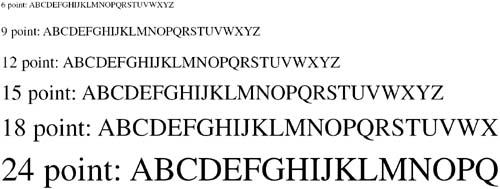
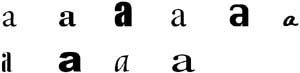
A 12-point font will typically yield six lines per inch of text at single spacing. We say “typically” because, as Michael Bruno explains, “Corresponding letters in the same size type may vary in height. We say that the face is either small on body…or large on body” (2000, p. 37). For example, the following are all 24-point lowercase A's:
The space between lines of type is called “leading” (pronounced ledding). Although most personal computer users are accustomed to selecting “single,” “space-and-a-half” or “double” spacing from the menu bar of their word processing programs, in professional practice leading is measured in points. Twelve points of leading applied to a 12-point font (called “solid” or single spacing) will yield six lines per inch of text. Using 24-points of leading with a 12-point font will result in double-spaced lines of text, or three lines per inch of text.
Adjusting the space between characters is called “kerning” and is also measured in points. Kerning can be increased or decreased to achieve specific typographic effects.
Bibliography
- Crisis Communication and Management
- Cyberspace
- Ethics
- Global Public Relations
- Africa, practice of public relations in
- Asia, practice of public relations in
- Australia and New Zealand, practice of public relations in
- Canada, practice of public relations in
- Confederation Europeenne des Relations Publiques (CERP)
- Europe, practice of public relations in
- Institute of Public Relations (IPR)
- International Public Relations Association
- South Africa, practice of public relations in
- Sweden, practice of public relations in
- Groups
- History
- Age of deference (end of)
- Ailes, Roger Eugene
- Antecedents of modern public relations
- Baker, Joseph Varney
- Barkelew, Ann H.
- Barnum, P. T.
- Battle of the currents
- Baxter, Leone, and Whitaker, Clem
- Beeman, Alice L.
- Berlowe, Phyllis
- Bernays, Edward
- Black, Sam
- Block, Ed
- Bogart, Judith S.
- Boulwarism
- Burson, Harold
- Byoir, Carl
- Chase, W. Howard
- Colorado Coal Strike
- Committee on Public Information
- Crisis communications and the Tylenol poisonings
- Cutlip, Scott M.
- Davis, Elmer, and the Office of War Information
- Deontology
- Drobis, David
- Druckenmiller, Robert T.
- Dudley, Pendleton
- Ellsworth, James Drummond
- Epley, Joe
- Exxon and the Valdez crisis
- Fleischman, Doris Elsa
- Four-Minute Men
- Frede, Ralph E.
- Golin, Al
- Gregg, Dorothy
- Griswold, Denny
- Hammond, George
- Hill, John Wiley
- Hood, Caroline
- Hoog, Thomas W.
- Howlett, E. Roxie
- Hunter, Barbara W.
- Industrial barons (of the 1870s–1920s)
- Insull, Samuel
- Jaffe, Lee K.
- Kaiser, Inez Y.
- Kassewitz, Ruth B.
- Kendrix, Moss
- Laurie, Marilyn
- Lee, Ivy
- Lesly, Phillip
- Lobsenz, Amelia
- Lucky Strike Green Campaign
- Muckrakers (and the age of progressivism)
- Newsom, Earl
- Oeckl, Albert
- Page, Arthur W.
- Parke, Isobel
- Parker, George
- Penney, Pat
- Perjury
- Plank, Betsy
- Propaganda
- Railroad industry in the 19th century
- Regulated monopolies
- Roberts, Rosalee A.
- Ross, Thomas J. “Tommy”
- Schoonover, Jean
- Smith, Rea
- Sonnenberg, Ben
- Spin
- Traverse-Healy, Tim
- Jargon
- Actuality
- Advance
- Backgrounder
- Beat
- Benchmarking
- Bio
- Bridge
- Byline
- Campaign
- Caption/cutline
- Chat
- Clip (news clip) and clipping services
- Co-optation
- Collateral
- Communitarianism
- Control
- Copy
- Credits
- Culture
- De-positioning
- Deadline
- Dialogue
- Differentiation
- Direct mail
- Discussion board
- Doublespeak
- Editing
- Editorial
- Endorsement
- Environmental scanning
- Event
- Fact sheet
- FAQs
- Feature
- Flack
- Flame
- Flier
- Focus group
- Font
- Frame
- Freelance writers
- Fundraising
- Gatekeepers
- Ghostwriting
- Goals
- Goodwill
- Graphics
- Gross impressions
- Hearing
- Hold and Hold for release
- Home page
- Hotline
- Human interest
- Hyperlink
- Identification
- Image
- Impressions
- Infomercial
- Internship
- Issues management
- Layout
- Legitimacy and legitimacy gap
- Lobbying
- Localize
- Logo
- Market share
- Mean and median
- Measuring/measures
- Media calls
- Media conferences
- Media effects
- Media relations
- Media release
- Mentoring
- Mission and vision statements
- Multimedia
- Narrowcasting/broadcasting
- News and newsworthy
- News services
- News story
- Newsletter
- Op-ed
- Openness
- Opportunity and threat
- Parent/student newsletter
- Perjury
- Philanthropy
- Photo-op
- Pitch letter
- Political speech
- Portfolio
- Position and positioning
- Practice
- Press agentry
- Press kit
- Privatizing public opinion (and “publictizing” private opinion)
- Proactivity and reactivity
- Professional and professionalism
- Promotion
- Propaganda
- Psychographics
- Psychological processing
- Public affairs
- Public interest
- Public opinion and opinion leaders
- Public relations department
- Public sector
- Public service announcements (PSAs)
- Publicist
- Publicity
- Publics
- Puffery
- Pyramid style
- Reach
- Reliability
- Reputation management
- Return on investment
- Risk communication
- Sampling
- Scales
- Search engine
- Segmentation
- Society
- Sound bite
- Spin
- Stakes
- Straight news
- Strain
- Strategies
- Stylebook
- Survey
- Symmetry
- Tactics
- Tag
- Target
- Third-party endorsement
- Trade associations (and Hill & Knowlton's role in)
- Trust
- Two-way and one-way communication
- Validity
- Wire service
- Management
- Media
- Organizations
- Agenda Online
- Business Wire
- Committee on Public Information
- Confederation Europeenne des Relations Publiques (CERP)
- Davis, Elmer, and the Office of War Information
- EDGAR Online
- Editor and publisher
- Federal Communications Commission
- Federal Trade Commission
- Institute for Public Relations (IPR)
- International Association of Business Communicators (IABC)
- International Public Relations Association
- Issue Management Council
- National Black Public Relations Society (NBPRS)
- National Investor Relations Institute
- PR Newswire
- PR Watch
- ProfNet
- Public Affairs Council
- Public Relations Society of America
- Public Relations Student Society of America
- Securities and Exchange Commission
- Practitioners
- Ailes, Roger Eugene
- Baker, Joseph Varney
- Barkelew, Ann H.
- Barnum, P. T.
- Baxter, Leone, and Whitaker, Clem
- Beeman, Alice L.
- Berlowe, Phyllis
- Bernays, Edward
- Black, Sam
- Block, Ed
- Bogart, Judith S.
- Burson, Harold
- Byoir, Carl
- Chase, W. Howard
- Cutlip, Scott M.
- Davis, Elmer, and the Office of War Information
- Drobis, David
- Druckenmiller, Robert T.
- Dudley, Pendleton
- Ellsworth, James Drummond
- Epley, Joe
- Fleischman, Doris Elsa
- Frede, Ralph E.
- Golin, Al
- Gregg, Dorothy
- Griswold, Denny
- Hammond, George
- Hill, John Wiley
- Hood, Caroline
- Hoog, Thomas W.
- Howlett, E. Roxie
- Hunter, Barbara W.
- Insull, Samuel
- Jaffe, Lee K.
- Kaiser, Inez Y.
- Kassewitz, Ruth B.
- Kendrix, Moss
- Laurie, Marilyn
- Lee, Ivy
- Lesly, Phillip
- Lobsenz, Amelia
- Newsom, Earl
- Oeckl, Albert
- Page, Arthur W.
- Parke, Isobel
- Parker, George
- Penney, Pat
- Plank, Betsy
- Roberts, Rosalee A.
- Ross, Thomas J. “Tommy”
- Schoonover, Jean
- Smith, Rea
- Sonnenberg, Ben
- Traverse-Healy, Tim
- Vail, Theodore Newton
- Relations
- Africa, practice of public relations in
- Alumni relations
- Annual community reports
- Antecedents of modern public relations
- Asia, practice of public relations in
- Australia and New Zealand, practice of public relations in
- Canada, practice of public relations in
- Codes of public relations practice
- College and university public relations
- Community relations
- Confederation Europeenne des Relations Publiques (CERP)
- Consumer/customer relations
- Europe, practice of public relations in
- Functions of public relations
- Government relations
- Institute of Public Relations (IPR)
- International Public Relations Association
- Investor relations
- Labor union public relations
- Managing the corporate public relations department
- Media relations
- Minorities in public relations
- National Black Public Relations Society (NBPRS)
- Online public relations
- Postcolonialism theory and public relations
- Public relations
- Public relations agency
- Public relations department
- Public Relations Field Dynamics (PRFD)
- Public relations research
- Public Relations Society of America
- Public Relations Student Society of America
- South Africa, practice of public relations in
- Sweden, practice of public relations in
- Travel and tourism public relations
- United Kingdom, practice of public relations in
- United States government and public relations
- Voter and constituent relations
- Warfare and public relations
- Women in public relations
- Reports
- Research and Analysis
- Benchmarking
- Case study
- Content analysis
- Experiment/experimental methods
- Fantasy theme analysis theory
- Focus group
- Formative research
- Interview as a research tool
- Process research
- Public relations research
- Qualitative research
- Quantitative research
- Reliability
- Research goals
- Sampling
- Scales
- Situation analysis
- Statistical analysis
- Survey
- Validity
- Theories and Models
- Accommodation: contingency theory
- Agenda-setting theory
- Apologia theory
- Attribution theory
- Chaos and complexity theory
- Co-creation of meaning theory
- Co-orientation theory
- Communitarianism
- Constructionism theory
- Contingency theory
- Critical theory
- Cultivation theory
- Decision theory
- Diffusion of innovations theory
- Discourse theory
- Dramatism and dramatism theory
- Encroachment theory
- Excellence theory
- Fantasy theme analysis theory
- Feminization theory
- Framing theory
- Game theory
- Health Belief Model
- Image restoration theory
- Impression management theory
- Information integration theory
- Intercultural communication theory
- Interpersonal communication theory
- Learning theory
- Management theory
- Motivation theory
- Narrative theory
- Network theory
- Perspectivism theory
- Persuasion theory
- Postcolonialism theory and public relations
- Power resource management theory
- Reinforcement theory
- Relationship management theory
- Rhetorical theory
- Rules theory
- Semiotics theory
- Situational theory of publics
- Social construction of reality theory
- Social exchange theory
- Social movement theory
- Spiral of silence theory
- Stakeholder theory
- Subjective expected utilities theory
- Symbolic interactionism theory
- Systems theory
- Theory of reasoned action
- Theory-based practice
- Transtheoretical model of behavior change
- Two-step flow theory
- Uncertainty reduction theory
- Uses and gratifications theory
- Loading...
Get a 30 day FREE TRIAL
-
 Watch videos from a variety of sources bringing classroom topics to life
 -
Read modern, diverse business cases
-
Explore hundreds of books and reference titles

Read next

More like this
Sage Recommends
We found other relevant content for you on other Sage platforms.
Have you created a personal profile? Login or create a profile so that you can save clips, playlists and searches