
Entry
Reader's guide
Entries A-Z
Subject index
Tornado Diagram
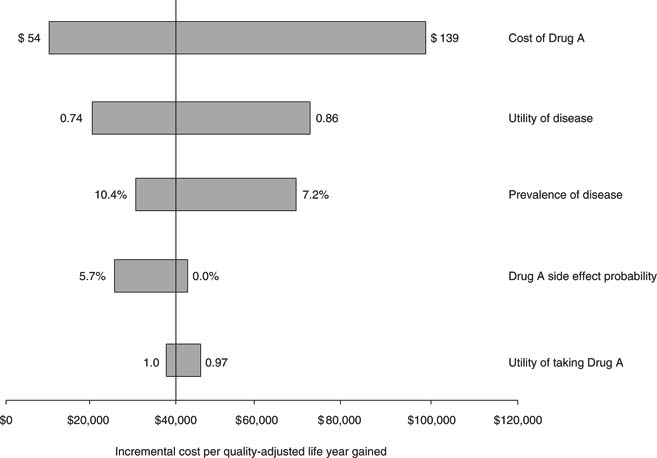
A tornado diagram (given this name due to its resemblance to a tornado) is a graphical method for displaying a series of univariate (or one-way) sensitivity analyses that has been commonly used in cost-effectiveness analysis. Figure 1 shows an example of a tornado diagram—with incremental cost-effectiveness value ranges arranged from the largest at the top to the smallest at the bottom. In a tornado diagram, the effects of individual parameter variation on results can be compared visually, allowing analysts to intuitively communicate which parameters are more sensitive to variation— that is, parameters whose variation has the greatest effects on the results of the analysis. In the example shown in Figure 1, individual variation of Drug A costs has the greatest effects on model results, and variation of Drug A side effect utility has the least effect. More recently, the use of tornado diagrams and univariate sensitivity analyses has been downplayed due to limitations of these methods and due to the use of other techniques that overcome these limitations.
To construct a tornado diagram, the analyst varies a single parameter over its range and notes the effects of this variation on the analysis results. In Figure 1, the incremental cost-effectiveness varies from $10,000 per quality-adjusted life year (QALY) gained when Drug A costs $54 to $97,000/QALY gained when Drug A costs $139. The vertical line through the bars at $39,000/QALY shows the base case results of the analysis, the expected value of the analysis when all parameters are set at their base case point estimates. The analyst will then repeat this procedure for each of the remaining parameters to be varied. Once the result range for each parameter has been calculated, parameters are arranged in the diagram from greatest to least effect on model results.
Some decision analysis software packages allow construction of tornado diagrams within the program itself. Tornado diagrams may also be constructed using the graphing functions of Microsoft Excel or through the use of a variety of Excel add-in programs.
Tornado diagrams have a number of limitations. They can be useful when two strategies are being compared, since tornado diagrams typically depict changes in the incremental cost-effectiveness ratio between two strategies. However, when three or more strategies are being considered, tornado diagrams become more difficult to use due to the differential effects of individual-parameter variation on multiple competing strategies and, at times, the effects of strategy dominance. Due to these shortcomings, alternative structures for tornado diagrams have been proposed. One such structure uses the net benefit framework to convert incremental cost-effectiveness ratios to either net monetary or net health benefits, thus bypassing some of the shortcomings of the conventional tornado diagram. However, this formulation gives a less intuitive picture of sensitive parameters and requires, due to the net benefit calculation, the choice of a single cost-effectiveness acceptability threshold.
Figure 1 A tornado diagram, depicting changes in incremental cost-effectiveness ratios (the x-axis) when individual parameter values are varied
...
- Basis for Making the Decision
- Acceptability Curves and Confidence Ellipses
- Beneficence
- Bioethics
- Choice Theories
- Construction of Values
- Cost-Benefit Analysis
- Cost-Comparison Analysis
- Cost-Consequence Analysis
- Cost-Effectiveness Analysis
- Cost-Minimization Analysis
- Cost-Utility Analysis
- Decision Quality
- Distributive Justice
- Dominance
- Equity
- Evaluating Consequences
- Expected Utility Theory
- Expected Value of Perfect Information
- Extended Dominance
- Health Production Function
- League Tables for Incremental Cost-Effectivenes: Ratios
- Marginal or Incremental Analysis, Cost-Effectiveness Ratio
- Monetary Value
- Moral Choice and Public Policy
- Net Benefit Regression
- Net Monetary Benefit
- Nonexpected Utility Theories
- Pharmacoeconomics
- Protected Values
- Rank-Dependent Utility Theory
- Return on Investment
- Risk-Benefit Trade-Off
- Subjective Expected Utility Theory
- Toss-Ups and Close Calls
- Value-Based Insurance Design
- Welfare, Welfarism, and Extrawelfarism
- Biostatistics and Clinical Epidemiology
- Analysis of Covariance (ANCOVA)
- Analysis of Variance (ANOVA)
- Attributable Risk
- Basic Common Statistical Tests: Chi-Square Test, t Test, Nonparametric Test
- Bayes's Theorem
- Bayesian Analysis
- Bayesian Evidence Synthesis
- Bayesian Networks
- Bias
- Bias in Scientific Studies
- Brier Scores
- Calibration
- Case Control
- Causal Inference and Diagrams
- Causal Inference in Medical Decision Making
- Conditional Independence
- Conditional Probability
- Confidence Intervals
- Confounding and Effect Modulation
- Cox Proportional Hazards Regression
- Decision Rules
- Diagnostic Tests
- Discrimination
- Distributions: Overview
- Dynamic Treatment Regimens
- Effect Size
- Equivalence Testing
- Experimental Designs
- Factor Analysis and Principal Components Analysis
- Fixed Versus Random Effects
- Frequentist Approach
- Hazard Ratio
- Hypothesis Testing
- Index Test
- Intraclass Correlation Coefficient
- Likelihood Ratio
- Log-Rank Test
- Logic Regression
- Logistic Regression
- Maximum Likelihood Estimation Methods
- Measures of Central Tendency
- Measures of Frequency and Summary
- Measures of Variability
- Meta-Analysis and Literature Review
- Mixed and Indirect Comparisons
- Multivariate Analysis of Variance (MANOVA)
- Nomograms
- Number Needed to Treat
- Odds and Odds Ratio, Risk Ratio
- Ordinary Least Squares Regression
- Parametric Survival Analysis
- Poisson and Negative Binomial Regression
- Positivity Criterion and Cutoff Values
- Prediction Rules and Modeling
- Probability
- Propensity Scores
- Randomized Clinical Trials
- Receiver Operating Characteristic (ROC) Curve
- Recurrent Events
- Recursive Partitioning
- Regression to the Mean
- Sample Size and Power
- Screening Programs
- Statistical Notations
- Statistical Testing: Overview
- Subjective Probability
- Subset Analysis: Insights and Pitfalls
- Survival Analysis
- Tables, Two-by-Two and Contingency
- Variance and Covariance
- Violations of Probability Theory
- Weighted Least Squares
- Decision Analysis and Related Mathematical Models
- Applied Decision Analysis
- Boolean Algebra and Nodes
- Decision Analyses, Common Errors Made in Conducting
- Decision Curve Analysis
- Decision Tree: Introduction
- Decision Trees, Advanced Techniques in Constructing
- Decision Trees, Construction
- Decision Trees, Evaluation
- Decision Trees, Evaluation With Monte Carlo
- Decision Trees: Sensitivity Analysis, Basic and Probabilistic
- Decision Trees: Sensitivity Analysis, Deterministic
- Declining Exponential Approximation of Life Expectancy
- Deterministic Analysis
- Discrete-Event Simulation
- Disease Management Simulation Modeling
- Expected Value of Sample Information, Net Benefit of Sampling
- Influence Diagrams
- Markov Models
- Markov Models, Applications to Medical Decision Making
- Markov Models, Cycles
- Markov Processes
- Reference Case
- Steady-State Models
- Stochastic Medical Informatics
- Subtrees, Use in Constructing Decision Trees
- Test-Treatment Threshold
- Time Horizon
- Tornado Diagram
- Tree Structure, Advanced Techniques
- Health Outcomes and Measurement
- Complications or Adverse Effects of Treatment
- Cost-Identification Analysis
- Costs, Direct Versus Indirect
- Costs, Fixed Versus Variable
- Costs, Opportunity
- Costs, Out-of-Pocket
- Costs, Semifixed Versus Semivariable
- Costs, Spillover
- Economics, Health Economics
- Efficacy Versus Effectiveness
- Efficient Frontier
- Health Outcomes Assessment
- Health Status Measurement Standards
- Health Status Measurement, Assessing Meaningful Change
- Health Status Measurement, Construct Validity
- Health Status Measurement, Face and Content Validity
- Health Status Measurement, Floor and Ceiling Effects
- Health Status Measurement, Generic Versus Condition-Specific Measures
- Health Status Measurement, Minimal Clinically Significant Differences, and Anchor Versus Distribution Methods
- Health Status Measurement, Reliability and Internal Consistency
- Health Status Measurement, Responsiveness and Sensitivity to Change
- Human Capital Approach
- Life Expectancy
- Morbidity
- Mortality
- Oncology Health-Related Quality of Life Assessment
- Outcomes Research
- Patient Satisfaction
- Regret
- Report Cards, Hospitals and Physicians
- Risk Adjustment of Outcomes
- SF-36 and SF-12 Health Surveys
- SF-6D
- Sickness Impact Profile
- Sunk Costs
- Impact or Weight or Utility of the Possible Outcomes
- Certainty Equivalent
- Chained Gamble
- Conjoint Analysis
- Contingent Valuation
- Cost Measurement Methods
- Decomposed Measurement
- Disability-Adjusted Life Years (DALYs)
- Discounting
- Discrete Choice
- Disutility
- EuroQol (EQ-5D)
- Health Utilities Index Mark 2 and 3 (HUI2, HUI3)
- Healthy Years Equivalents
- Holistic Measurement
- Multi-Attribute Utility Theory
- Person Trade-Off
- Quality of Well-Being Scale
- Quality-Adjusted Life Years (QALYs)
- Quality-Adjusted Time Without Symptoms or Toxicity (Q-TWiST)
- SMARTS and SMARTER
- Split Choice
- Utilities for Joint Health States
- Utility Assessment Techniques
- Willingness to Pay
- Other Techniques, Theories, and Tools
- Artificial Neural Networks
- Bayesian Networks
- Bioinformatics
- Chaos Theory
- Clinical Algorithms and Practice Guidelines
- Complexity
- Computer-Assisted Decision Making
- Constraint Theory
- Decision Board
- Decisional Conflict
- Error and Human Factors Analyses
- Ethnographic Methods
- Expert Systems
- Patient Decision Aids
- Qualitative Methods
- Story-Based Decision Making
- Support Vector Machines
- Team Dynamics and Group Decision Making
- Threshold Technique
- Perspective of the Decision Maker
- Advance Directives and End-of-Life Decision Making
- Consumer-Directed Health Plans
- Cultural Issues
- Data Quality
- Decision Making in Advanced Disease
- Decisions Faced by Hospital Ethics Committees
- Decisions Faced by Institutional Review Boards
- Decisions Faced by Nongovernment Payers of Healthcare: Managed Care
- Decisions Faced by Patients: Primary Care
- Decisions Faced by Surrogates or Proxies for the Patient, Durable Power of Attorney
- Diagnostic Process, Making a Diagnosis
- Differential Diagnosis
- Evaluating and Integrating Research Into Clinical Practice
- Evidence Synthesis
- Evidence-Based Medicine
- Expert Opinion
- Genetic Testing
- Government Perspective, General Healthcare
- Government Perspective, Informed Policy Choice
- Government Perspective, Public Health Issues
- Health Insurance Portability and Accountability Act Privacy Rule
- Health Risk Management
- Informed Consent
- Informed Decision Making
- International Differences in Healthcare Systems
- Law and Court Decision Making
- Medicaid
- Medical Decisions and Ethics in the Military Context
- Medical Errors and Errors in Healthcare Delivery
- Medicare
- Models of Physician–Patient Relationship
- Patient Rights
- Physician Estimates of Prognosis
- Rationing
- Religious Factors
- Shared Decision Making
- Surrogate Decision Making
- Teaching Diagnostic Clinical Reasoning
- Technology Assessments
- Terminating Treatment, Physician Perspective
- Treatment Choices
- Trust in Healthcare
- The Psychology Underlying Decision Making
- Accountability
- Allais Paradox
- Associative Thinking
- Attention Limits
- Attraction Effect
- Automatic Thinking
- Axioms
- Biases in Human Prediction
- Bounded Rationality and Emotions
- Certainty Effect
- Cognitive Psychology and Processes
- Coincidence
- Computational Limitations
- Confirmation Bias
- Conflicts of Interest and Evidence-Based Clinical Medicine
- Conjunction Probability Error
- Context Effects
- Contextual Error
- Counterfactual Thinking
- Cues
- Decision Making and Affect
- Decision Modes
- Decision Psychology
- Decision Weights
- Decision-Making Competence, Aging and Mental Status
- Deliberation and Choice Processes
- Developmental Theories
- Dual-Process Theory
- Dynamic Decision Making
- Editing, Segregation of Prospects
- Emotion and Choice
- Errors in Clinical Reasoning
- Experience and Evaluations
- Fear
- Frequency Estimation
- Fuzzy-Trace Theory
- Gain/Loss Framing Effects
- Gambles
- Hedonic Prediction and Relativism
- Heuristics
- Human Cognitive Systems
- Information Integration Theory
- Intuition Versus Analysis
- Irrational Persistence in Belief
- Judgment
- Judgment Modes
- Learning and Memory in Medical Training
- Lens Model
- Lottery
- Managing Variability and Uncertainty
- Memory Reconstruction
- Mental Accounting
- Minerva-DM
- Mood Effects
- Moral Factors
- Motivation
- Numeracy
- Overinclusive Thinking
- Pain
- Pattern Recognition
- Personality, Choices
- Preference Reversals
- Probability Errors
- Probability, Verbal Expressions of
- Problem Solving
- Procedural Invariance and Its Violations
- Prospect Theory
- Range-Frequency Theory
- Risk Attitude
- Risk Aversion
- Risk Communication
- Risk Perception
- Scaling
- Social Factors
- Social Judgment Theory
- Stigma Susceptibility
- Support Theory
- Uncertainty in Medical Decisions
- Unreliability of Memory
- Value Functions in Domains of Gains and Losses
- Worldviews
- Loading...
Get a 30 day FREE TRIAL
-
 Watch videos from a variety of sources bringing classroom topics to life
 -
Read modern, diverse business cases
-
Explore hundreds of books and reference titles

Read next

More like this
Sage Recommends
We found other relevant content for you on other Sage platforms.
Have you created a personal profile? Login or create a profile so that you can save clips, playlists and searches